Wednesday, September 11, 2013
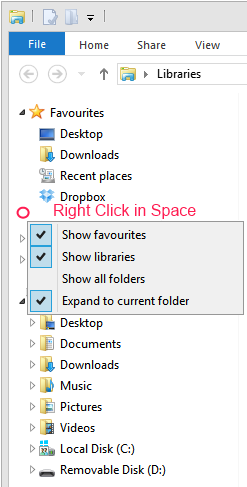
Get Libraries back in Windows 8.1
Really annoyingly the Libraries feature in File Explorer seems to be turned off when you upgrade to Windows 8.1. To turn them back on Right click in the space between folders and select "Show Libraries".


Thursday, June 13, 2013
Are you a Manager or a Leader?
Are you a manager or a leader?
- The manager has subordinates; the leader has followers.
- The manager does things right; the leader does the right thing.
- The manager administers; the leader continually innovates.
- The manager is a copy; the leader is an original.
- The manager maintains; the leader develops.
- The manager focuses on systems and structure; the leader focuses on innovation.
- The manager relies on control; the leader inspires trust.
- The manager has a short-range view; the leader has a long-range perspective.
- The manager asks how and when; the leader asks what and why.
- The manager has his or her eye always on the bottom line; the leader’s eye is on the horizon.
- The manager imitates; the leader originates.
- The manager accepts the status quo; the leader challenges it.
- The manager is the classic good soldier; the leader is his or her own person.
- The manager seeks group consensus for each decision; the leader makes decisions independently and regardless of the opinion of others.
- The manager assembles teams of those, like themselves, to advise on and validate every decision, leaders decide for themselves without external influence.
- The manager acts on expert advice; the leader has the courage to act against an expert’s advice.
- The manager knows the cost of everything, the leader knows the value of everything.
- The manager asks for a task to be performed, the leader shows the best way to do it.
- The manager always has someone else to blame for every mistake, the leader learns from his own mistakes.
- A leader takes people where they don’t necessarily want to go but ought to be.
- When the leader is finished with his work, the people say it happened naturally.
- Leaders are not team players, they feel no need to function as a group.
- The manager climbs the corporate ladder quickly, leaders don’t use ladders to climb.
- The person at the top of the org chart is rarely its true leader.
- Managers spend most of their time thinking they are leaders by virtue of their position.
- Leaders don't have all the answers whilst managers believe they do.
- Managers can be managed themselves, leaders can't be easily led or managed.
- Leaders 'begin with the end in mind.' Managers 'begin with the beginning in mind'.
- Leadership is freedom of action. Management is working within set boundaries.
- Leadership cannot be outsourced or delegated, management can.
- Leaders persevere until the goal is reached, managers abandon projects because they see only on the bottom line.
- Managers seek continuity, Leaders seeks change.
- Managers focus on goals for improvement. The Leader focuses on goals of innovation.
- Management's power is based on position or authority; Leadership power is based on personal influence and trust.
- The manager demonstrates skill in technical competence but the Leader demonstrates skill in selling the vision.
- The manager demonstrates skill in administration. A Leader demonstrates skill in dealing with ambiguity.
- The manager demonstrates skill in supervision. A Leader demonstrates skill in persuasion.
- The manager diligently seeks legal agreement at each stage of a project. A leader proceeds much more quickly by personal agreement based on trust.
- You manage things, you lead people.
- Leadership has no performance metrics, management does.
- Managers manage, so by nature are natural followers. Leaders lead.
- Management is a career. Leadership is a calling.
- Managers focus on the bottom line; leaders focus on adding value.
- Managers minimise todays costs, leaders maximise future value.
- Managers solve problems sequentially - step by step, leaders solve problems quicker by working in parallel.
- Managers take a salary, leaders work to change the world.
- A managers social identity is defined by title and position, a leaders identity by how he's changed the world.
- Without followers, there is no leader … there is just one person with a goal or idea.
- Managers prefer process, leaders prefer agility.
- The manager is SAD, the leader is MAD. SAD = Same as we've Always Done. MAD = Makes A Difference
Tuesday, August 28, 2012
Installing NVIDIA drivers on 64bit Windows 8
I upgraded a Sony laptop from Windows 7 to Windows 8 but the upgrade did not detect the Nvidia graphics chipset. I grabbed the latest Windows 8 64bit Nvidia driver from http://www.laptopvideo2go.com/ but the installer failed. It turns out that 64 bit Windows 8 will not install a driver unless it’s signed. You can disable signature checking by :
- Windows Key + C to bring up charms menu
- Click “Settings”
- Click “Change PC Settings”
- Click “General”
- Under Advanced Start-up click the “Restart Now” button
- Click “Troubleshoot”
- Click “Advanced Options”
- Click “Start-up Settings”
- Click “Restart” button
- Press option 7 – Disable driver signature enforcement
- You can now install your un-signed 64bit driver
No DVD after upgrading Windows 7 to Windows 8
I upgraded my Windows 7 laptop to Windows 8 RTM but the DVD player refused to work. It's a MATSHITA BD-CMB UJ141EF drive in a Toshiba laptop. It was showing a yellow exclamation mark in Device Manager which reported the following error "Windows cannot start this hardware device because its configuration information (in the registry) is incomplete or damaged. (Code 19)". Deleting and re-scanning in Device Manager made no difference.
SOLUTION:
I noticed a service called "TOSHIBA Optical Disk Drive Service" which was presumably installed as part of the original Windows 7 setup. I used "System Configuration" to stop this service and the drive now works correctly in Windows 8.
Sunday, August 19, 2012
Getting CRM2011 Outlook Client running on Windows 8
I upgraded my Windows 7 machine to Windows 8 and found a problem with CRM2011. I upgraded the Outlook Client to UR10 but still had problems. There are two things you need to do
- Ensure Windows Identity Framework 3.5 is installed (this is now a 'feature' of Windows 8 and can be enabled from "Turn Windows Features on or off" from Programs and Features.
- Ensure you are using your full Domain username when entering the account details in the CRM connection dialog. I was originally using my email address to login. For some reason that does not work and you need to use the full domain username. You can find the full domain username from System>Administration>Users> Select a user >General>Account Information.
Sunday, April 15, 2012
Programming with Scratch
Inspired by the launch of the Raspberry Pi computer (http://www.raspberrypi.org/) I went into
my daughter’s school last month to teach the key stage 2 kids some games programming
with Scratch. See more here ( http://www.barnabasoley.cambs.sch.uk/Our+School/Golden+Time ). Just waiting for some Pi's to arrive and we can make our own games console!
I was introduced to computing by soldering together ZX80
kits when I was about their age. I think it’s critical for the UK to get a
new generation of kids into creating content rather than just consuming it. I hope the Raspberry Pi will be as influential as the BBC Micro was for me and my generation.
Thursday, December 08, 2011
Celsius wins at 2011 UK IT Industry Awards

I'll be talking about how our celsius product won the Infrastructure Innovation of the Year Award at the 2011 UK IT Industry Awards at 06:20 on 12/12/2011 - BBC Radio Cambridgeshire.
Wednesday, November 30, 2011
BBC Micro is 30 years old!

It's strange now that I'm based in Cambridge and occasionally bump into people who were involved with Acorn / Sinclair in the old days.
Wednesday, November 16, 2011
Silicon Valley comes to Cambridge
Looking forward to meeting Reid Hoffman (Chairman of LinkedIn) and numerous other of the most exciting and disruptive Silicon Valley companies (Apple, Google...) at the Silicon Valley comes to UK event in Cambridge on Friday. Alquist are one of the showcase companies exhibiting at the event. It should be an interesting day!
Friday, November 11, 2011
UK IT Industry Awards


Friday, September 02, 2011

Alquist's celsius product has been named as a finalist in the British Computer Society & Computing UK IT Industry Awards 2011, in the category of Infrastructure Innovation of the Year.
The UK IT Awards are a platform for the entire profession to celebrate best practice, innovation and excellence. The shortlisted organisations have been selected based on their business success in the past 12 months, and demonstrable high levels of customer satisfaction and business benefits from the users of their products and services, with judges considering each on its merits in terms of professionalism, excellence, innovation and measurable success.
With the announcement of the finalists, David Clarke, Chief Executive Officer, BCS, The Chartered Institute for IT, said: “Congratulations to the finalists; the competition to reach this stage of our prestigious Awards is tough. Our Awards are central to our mission to recognise the innovation and professionalism of those working in IT and I’m delighted that every year we have such a variety of high quality entries. They are an excellent reflection of the impact IT has on so many aspects of our information society and the potential IT has to transform business, society and our lives.”
Abigail Waraker, Editor of Computing commented: “I would like to congratulate the finalists. The UK IT Industry Awards are rigorously judged and to be announced as a finalist is a great achievement.”
The award ceremony itself will take place in London on 10th November.
See http://www.ukitindustryawards.co.uk/ and Computing Magazine Article
Tuesday, December 28, 2010
Datacenter Leaders Award winner


Friday, July 02, 2010
Vodafone Sure Signal with Vigor 2820
In order to get my Vodafone Sure Signal to work with my Vigor 2820 router I needed to make the following changes on the Router. The Vigor 2820 is running firmware 3.3.4_232201.
The Sure Signal uses DHCP to get an IP address. I made sure I had allocated a fixed address using the LAN->Bind IP to MAC menu. The MAC address is shown on the Sure Signal serial sticker.

From the NAT->Open Ports menu I added an entry to the list of open ports

I named the entry “Vodafone Sure Signal”, entered the fixed IP address of the Sure Signal (192.168.65.2 in my case, yours will undoubtedly be different) and entered the following port numbers.

TCP Port 50
UDP Port 500
UDP Port 4500
Once all the settings were made it took about 15 minutes before the @ light stopped flashing slowly and the bottom green tick light came on.
The lights now look like this :

(all lights are on and not flashing)
And for the first time in 7 years I have a 5 bar 3G mobile signal at home!

Until now I’ve not been able to get any signal at all. Fantastic, I can finally use my phone!
New iPhone 4
My new Vodafone iPhone 4 arrived today. I was previously with O2 but switched to Vodafone so i could use their Sure Signal Femto Cell repeater.
I was worried that switching networks would be a problem. I’m pleased to report it was very straightforward.
I plugged the new iPhone4 into my PC. iTunes recognised the new phone and restored my old 3G settings. After about 30 minutes of copying files it was all working and my old number was working on the new network.
The only thing I had to do was re-enter my Wi-Fi and email passwords.
It was really easy despite changing networks.
The only annoying thing with Vodafone is that they do not seem to support visual voicemail on the iPhone 4. Apart from that moving networks was very easy.
Monday, May 10, 2010
URLScan blocks download of Click Once setup.exe file
I was setting up an IIS7.5 site to host a Click Once application yesterday. I found that URLScan was blocking the setup.exe file from being downloaded. Once I removed URLScan the clients could download setup.exe.
Friday, January 08, 2010
IIS7 SMTP Logging on Windows Server 2008
I’ve just noticed that SMTP logging on Windows Server 2008 does not work unless you add the “ODBC Logging” module to the Web Server role. It appears that the ODBC logging module must be added even if you are using a non-ODBC logging format.
Wednesday, October 07, 2009
WPF ComboBox select item when using ItemsSource
I have a WPF ComboBox that is databound to a Linq query.
var mylinqdata = from d in DataTable0.AsEnumerable()select new{Status = d.Field<string>(0).Trim(),Progress = d.Field<string>(1).Trim()};
dlg.cb_Status.ItemsSource = mylinqdata;
When data is bound to a WPF control using ItemsSource you must change the selected item using SelectedIndex. Here is the code I use.
dlg.cb_Status.SelectedIndex = mylinqdata.ToList().FindIndex(d => d.Status == loom.Status);
Here is the XAML of the ComboBox
<ComboBox Name="cb_Status">
    <ComboBox.ItemTemplate>
        <DataTemplate>
            <TextBlock Text="{Binding Path=Progress}"></TextBlock>
        </DataTemplate>
    </ComboBox.ItemTemplate>
</ComboBox>
Friday, October 02, 2009
Linq group by multiple columns
Here is a bit of linq to group by multiple columns. It’s not very well documented so I’ve included a sample below.The trick is to use an anonymous type after the group by clause.
var data3 = from d in db.Assembly_V2s
group d by new { Column1 = d.AssemblyID / 100, Column2 = d.Description.Trim() } into g
orderby g.Key.Column1
select new { Column1 = g.Key.Column1, Column2 = g.Key.Column2 };
Wednesday, September 23, 2009
HyperLinkField in GridView with multiple fields does not work
<asp:GridView ID="GV" runat="server" AutoGenerateColumns="False">
<Columns>
<asp:HyperLinkField DataNavigateUrlFields="CAM,Floor,Riser" DataNavigateUrlFormatString="HorzHandover.aspx?CAM={0}&Floor={1}&Riser={2}" Text="Handover"/>
<asp:TemplateField>
<ItemTemplate>
<asp:HyperLink ID="HyperLink1" runat="server" NavigateUrl='<%# "Export.aspx?CAM="+Eval("CAM")+"&Floor="+Eval("Floor")+"&Riser="+Eval("Riser") %>' Text="Signoff"></asp:HyperLink> </ItemTemplate>
</asp:TemplateField>
</Columns>
</asp:GridView>
I think this is a bug in asp.net. HyperLinkField in GridViews with multiple fields do not seem to work at all. You have to turn column into a template to make it work (as shown above)
Thursday, August 27, 2009
Serving Silverlight 3 apps from IIS6
If you want to serve Silverlight 3 apps from an IIS6 server running on Windows Server 2003 you need to add the following three mime types (I added them at the server level). If you don’t make these changes the web page will show a blank Silverlight window. You can right click to get the Silverlight menu but your app does not run.
.xap application/x-silverlight-app
.xaml application/xaml+xml
.xbap application/x-ms-xbap
I discovered that IIS needs to be restarted before the settings take effect. To restart IIS run IISRESET from a command prompt.
Subscribe to:
Posts (Atom)
