Monday, September 25, 2006

SQL Server 2005 SP1 does not work on Vista 5728

SQL Server 2005 can be installed on Vista 5728 (Despite the warning indicating it's not compatible), but installing SP1 seems to stop SQL from working. The solution seems to be to remove and then re-install SQL Server 2005.

When is SQL Server 2005 SP2 going to be available? Apparently this will be the version supported on Vista.

SQL Server 2005 SP1

I had a wierd problem trying to install SP1 on SQL Server 2005 today...

Originally I had the upgrade file (SQLServer2005SP1-KB913090-x86-ENU.exe) on an external USB hard drive, I found that I had to copy the file from an external USB hard disk to my local machine and then remove the external USB drive from my system for the install to work. Before I removed the USB drive the upgrade tool was putting the unpacked files on the USB drive (probably as it had most free space) and for some wierd reason they would not install from there. Once the USB drive was removed the installer unpacked the files to drive D: and the installer worked fine.

Vista 5728

I’ve been running Vista RC1 for a couple of weeks and have just upgraded to 5728. Seems nice and stable. Plugged in a 1Gb USB key to see how much of a speed improvement ReadyBoost gives. It seems quicker when you have loads of apps open. However my Sony MemoryStick and volume controls still don't work.

I had some trouble upgrading Office 2007 to B2TR. In the end I had to remove Office B2 and reinstall. I could not use the uninstall option and had to resort to using the following utility to remove Office 2007 Beta 2.

You can try the Cleanup Utility from here : http://support.microsoft.com/kb/290301/en-us

Friday, September 01, 2006

Vista 5536

I've been running 5536 for a couple of days now and it's looking much better than earlier builds. The video driver is now recognising my laptop screen correctly. However still two problem drivers. The extra buttons on my Sony laptop still don't work. In addition the Memory stick has still not been fixed. I emailed Sony about these problems however I don't expect any response from them...they are not good at customer support!

Just found out that 5600 will be available next week. Still waiting to get hold of Office 2007 B2TR..hopefully that will be out soon!

Tuesday, August 22, 2006

Visual Studio 2005 File Open Crash

Today I had a c# project that caused VS2005 to crash whenever I tried to open a file using file->Open->File...

I think the hidden user options file (projectname.suo) had become corrupt. As soon as I deleted the .suo file I could use file open command again.

The .suo file is in the same folder as the .snl file.

Wednesday, July 26, 2006

Vista 5472

Yesterday I upgraded my Vista Beta2 machine to the latest build 5472. The upgrade completed successfully but took about 4 hours to finish! So far I have found the following problems:-

I have a Sony VGN-A497XP laptop with an ATI X600 screen. Since upgrading to 5472 my max resolution has dropped from 1920x1200 to 1600x1200. I’m not happy with this!

There are now 3 devices without drivers. Windows update cannot find them.

The memory stick still does not work

Laptop extra buttons (volume up down, CD eject etc) still do not work.

Welcome Centre->Setup Devices does not work as it says reinstdrvs.exe does not exist.

Monday, June 26, 2006

Another hard disk dead


I had a Freecom Classic Mobile HD 2.5" 40Gb external USB hard drive on which I had installed Office 2007 & VS2005. It stopped working today despite only having bought it a couple of months ago.

Tuesday, June 20, 2006

Desktop background


Here is my favourite 1900 x 1200 photo of Meribel that I took earlier this year. Feel free to use it as your desktop background.

Download File

Monday, June 19, 2006

10GBaseT & Cabling Standards

Last week I was at the British Standards Institute TCT7 committee meeting reviewing several important changes to the UK & European cabling standards. I thought I would provide a quick summary, if you would like any further details please ask.

10GBaseT – Ethernet Standards
The IEEE have finished the 10 Gigabit Ethernet over copper cabling standard on time and it will be officially published very soon. However there is widespread concern that important elements have been omitted in a rush to finish the standard “on time”. Please remember the 10GBaseT standard is an electronic protocol standard NOT a cabling standard. 10GBaseT will support a channel length of 100m over Cat 6 FTP and Cat 7 FTP (both available today) and over 100m of Cat6a UTP (in the future – standard work is just starting now). The chipset manufacturers are having problems with the large amount of power needed for each chip. They currently need about 15W per port, unfortunately the chips themselves will only support 4W without overheating. As a result the pre-production chips are having to be manufactured in a larger package so they can disperse the heat better. The amount of power required is a big concern as a typical 24 port 1U switch will get very hot and thus un-reliable. The electronics industry is hoping that by making the chips smaller they can reduce the heat output, unfortunately this technology is not currently available but should be within 4-5 years. Some manufacturers have introduced pre-standard chipsets but they do not work with each other as they use different techniques to reduce power requirements. The current non-standard chipsets have only been able to manage a 30m link over Cat 6 as these can be produced more easily as they do not need as much electronics and so stay cooler. There is significant work to do before 10GBaseT becomes mainstream, do not expect widespread desktop deployment for 5-7 years.

European Cabling Standards
Firstly it’s important to remember that there are two cabling standards the American TIA/EIA who define Cat 5, Cat 5e, Cat 6 and will define Cat 6a in the future. The rest of the world uses the ISO 11801:2002 Class D, Class E (and Class Ea in the future) series of standards. Until now Cat 5e and Cat 6 have been almost identical to Class D and Class E however the American Cat 6a standard is looking as though it will be much less stringent than the Worldwide Class Ea standard. This problem of Cat 6a not being equal to Class Ea is a big issue that will hopefully be resolved before either standard is published. The very earliest these standards could be published is Q2 2007 but this would mean several important items would have to be left out and added later.

Official work on the cabling standard could not start until the 10GBaseT standard was published. Today we reviewed some of the proposed amendments to ISO 11801:2002 to add Class Ea limits. The amendments proposed will probably be rejected by the UK committee because they are very incomplete and in places simply wrong. Some of the cabling manufacturers are pushing to get this amendment published to support their “10Gig” product story. However the amendments include parameters for the “Channel” only, there are no “Permanent link” limits. This has been done in an attempt to speed up the process, adding permanent link parameters will take an extra 12-18 months. Without any “Permanent link” limits there will be nothing that installers can use to test a system. In my view there is no point publishing a new standard if it does not have any parameters that can be used to test against. The standard needs to be done properly with both channel and permanent link limits, it is likely that this process will take until at least Q2 or Q3 2008.

Any cable manufacturer pushing a “10 Gig” story now is really selling something that is still 18-24 months from being completed. (and that assumes everything goes to plan... history shows that this seldom happens and the process will take much longer)

XML Test Result Export
My initiative to create a standard file format for exporting test results from handheld testers is now a European EN50346 draft format and will be fully reviewed at the September meeting.

Tuesday, May 30, 2006

Vista & Office 2007 Beta 2

I’m now running on Vista Ultimate Beta 2 with Office 2007 Beta 2. The Vista install worked fairly well although it did not install an audio driver for my Sony VGN-A497XP laptop. The XP audio driver seemed to install OK. There are still 4 or 5 devices without drivers. One being the Sony memory stick which no longer seems to work.

Office installed without any problems. I’m not very impressed with Outlook it still does a terrible job of multi-tasking. We use an outsourced Exchange Server provider so we access Exchange using RPC over HTTPS and the whole program hangs when getting data from the server. Why is this not implemented on a separate thread so it does not stop the whole UI? Cached mode with RPC over HTTPS does not seem to work. Word is great, if you can read this then it has successfully uploaded this blog entry from Word.

One thing to notice when using Visual Studio 2005...you must right click on the application and select “Run as Administrator” if you want to debug any ASP.NET pages. If you do not do this then the execution does not stop at any of the breakpoints.

Monday, March 20, 2006

Get TEXTMETRIC from font in C#

Today I needed to get the TEXTMETRIC details for a font in c#. In C++ this was very easy but .NET does not seem to have any functions to get this information. Here is how I ended up doing it:-

[Serializable, StructLayout (LayoutKind.Sequential, CharSet = CharSet.Auto)]

public struct TEXTMETRIC

{

public int tmHeight;

public int tmAscent;

public int tmDescent;

public int tmInternalLeading;

public int tmExternalLeading;

public int tmAveCharWidth;

public int tmMaxCharWidth;

public int tmWeight;

public int tmOverhang;

public int tmDigitizedAspectX;

public int tmDigitizedAspectY;

public char tmFirstChar;

public char tmLastChar;

public char tmDefaultChar;

public char tmBreakChar;

public byte tmItalic;

public byte tmUnderlined;

public byte tmStruckOut;

public byte tmPitchAndFamily;

public byte tmCharSet;

}

[DllImport ("gdi32.dll", CharSet = CharSet.Unicode)]

static extern bool GetTextMetrics (IntPtr hdc, out TEXTMETRIC lptm);

[DllImport ("gdi32")]

private static extern IntPtr SelectObject (

IntPtr hdc,

IntPtr hObj

);


In my paint code (FontName is a string holding the name of the font)

// Get TEXTMETRIC details for font

Font font = new Font (FontName, size, FontStyle.Bold, GraphicsUnit.Pixel);

IntPtr hdc = g.GetHdc ();

IntPtr hFontOld = SelectObject (hdc, font.ToHfont ());

TEXTMETRIC tm;

GetTextMetrics (hdc, out tm);

SelectObject (hdc, hFontOld);

g.ReleaseHdc (hdc);


Then I can use the tm object to extract all the font details

PointF topleft = new PointF (x + cx, displayy + cy - (tm.tmExternalLeading + tm.tmInternalLeading));

Tuesday, March 07, 2006

IE7 stops VS2005 CSS Style Builder

When you install IE7 it stops VS2005's CSS style builder from working. There is a fix for this bug documented on the Microsoft web site:-

http://lab.msdn.microsoft.com/ProductFeedback/viewFeedback.aspx?feedbackId=FDBK46543

Saturday, February 25, 2006

Word Action Pane with VSTO in C# 2005

I have created a Word Action pane with a tab control contained within the user control. In order to force the user control to strech to fill the action pane space you need the following code:

private QuoteBuilder qb_actionpane = new QuoteBuilder ();

private void ThisDocument_Startup (object sender, System.EventArgs e)

{

qb_actionpane.Dock = DockStyle.Fill;

this.ActionsPane.StackOrder = Microsoft.Office.Tools.StackStyle.None;

this.ActionsPane.Controls.Add (qb_actionpane);

}


The problem is that VS2005 does not display the .Dock property so you have to set it yourself in code. In addition you need the following code

this.ActionsPane.StackOrder = Microsoft.Office.Tools.StackStyle.None;

Without this the user control does not fill the available space.

Thursday, February 16, 2006

C# - Fill TreeView with SQL data

Here is some c# code to fill a treeview with hierarchal data from an sql table. The SQL table looks like this:-


Each item in the database has a pointer to it's parent (which can be null for top level items). The DisplayOrder field is used to alter the display order of items at the same level. NodeType should be "Node" for a nodes, anything else is assumed to be a "document".

The tree is displayed like this:-
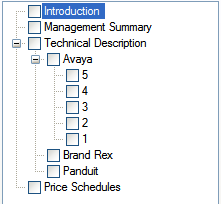

Here is the code

private void LoadTreeview ()

{

// This code fills a DataTable with an SQL Query

DataTable table = DatabaseUtility.ExecuteDataTable (

new SqlConnectionSettings.Default.SQL_DSN), (Properties.

"select ID, ParentID, DisplayOrder, NodeType, NodeText from TableName"

);

// Fill the TreeView with database data. Use null

// as parentid for top level

AddKids (null, "ParentID is null", "DisplayOrder", table);

}

private void AddKids (string parentid, string filter, string sort, DataTable table)

{

DataRow[] foundRows = table.Select (filter, sort);

if (foundRows.Length == 0)

return;

// Get TreeNode of parent using Find which looks in the name

// property of each node. true itterates all children

TreeNode[] parentNode = treeView1.Nodes.Find (parentid, true);

if (parentid != null)

if (parentNode.Length == 0)

return;

// Add each row to tree

for (int i = 0; i <= foundRows.GetUpperBound (0); i++)

{

string nodetype = foundRows[i]["NodeType"].ToString ();

string nodetext = foundRows[i]["NodeText"].ToString ();

string nodeid = foundRows[i]["ID"].ToString ();

TreeNode node = new TreeNode ();

node.Text = nodetext;

node.Name = nodeid; // This is critical as the Find method searches the Name property

if (parentid == null)

treeView1.Nodes.Add (node); // Top Level

else

parentNode[0].Nodes.Add (node); // Add children under parent

// Itterate into any nodes

if (nodetype.ToLower () == "node")

AddKids (nodeid, "ParentID=" + nodeid, sort, table);

}

}


The trick here is to use the nodetype.Name to hold a unique ID of each item. The treeview.Nodes.Find("xxx") command is the olny way you can search the entire tree (including children) and it searches the .Name property only.

Using ASP.NET 2.0 GridView Template Controls

I'm using a GridView control on an ASP.NET 2.0 page. I have added some templated columns so the grid looks like this:-

When the Test button is pressed I want to get the values in the TextBoxes. There are two options:-

Option 1
Set the CommandArgument of the Test button to hold a value indicating the row number. You need to add the following to the Test button's HTML definition

CommandArgument='<%# Container.DataItemIndex %>'


IE7B2 does not render the text above correctly, Firefox is OK, it should look like this :

Then you can get the Row and TextBox contents using this code

protected void GridView1_RowCommand (object sender, GridViewCommandEventArgs e)

{

if (e.CommandName.ToLower () == "test")

{

int rowindex = int.Parse (e.CommandArgument.ToString ());

GridViewRow row1 = GridView1.Rows[rowindex];

TextBox tb_percent1 = row1.FindControl ("TextBox1") as TextBox;

TextBox tb_value1 = row1.FindControl ("TextBox2") as TextBox;

TextBox tb_month1 = row1.FindControl ("TextBox3") as TextBox;

TextBox tb_year1 = row1.FindControl ("TextBox4") as TextBox;


Option 2

You can use the following code. With this option you do not need to set the CommandArgument on the button.

protected void GridView1_RowCommand (object sender, GridViewCommandEventArgs e)

{

if (e.CommandName.ToLower () == "test")

{

GridViewRow row2 = (GridViewRow) ((Control) e.CommandSource).Parent.Parent;

TextBox tb_percent2 = row2.FindControl ("TextBox1") as TextBox;

TextBox tb_value2 = row2.FindControl ("TextBox2") as TextBox;

TextBox tb_month2 = row2.FindControl ("TextBox3") as TextBox;

TextBox tb_year2 = row2.FindControl ("TextBox4") as TextBox;

Wednesday, February 08, 2006

VS2005 Snippets

How do I fix this problem with VS2005 snippets?

Notice application and Visual c#2005 are in there twice.

Ambiguous match found error in precompiled ASP.NET page

I upgraded an ASP.NET 1.1 project to 2.0 and precompiled it before uploading it to my production web server. Unfortunately one of the pages refused to work (I thought pre-compilation was supposed to find these problems!).

This is the error I was getting when I viewed the problem page:-

Parser Error Message: Ambiguous match found.

It turns out that Visual Studio 2005 creates hidden field declarations for all controls inserted into a page. For some reason my old code had the following field declaration:-

18 namespace ITM

19 {

20 ///

21 /// Summary description for WebForm1.

22 ///

23 public partial class WebForm1 : System.Web.UI.Page

24 {

25 protected System.Web.UI.HtmlControls.HtmlInputFile file2;


Because my code had a declaration for file2 it clashed with the declaration that VS2005 has created. This results in a project that compiles without any problem but refuses to run!!! (The project woks fine in dynamic compilation mode)

This bug has already been reported to Microsoft as bug FDBK38831 but it is shown as "Won't Fix" because VS2005 cannot detect the error. It would be better if the error message was a little clearer!

If you have this problem make sure you do not declare any variables with the same name as any of your controls.

Monday, February 06, 2006

Upgrade Asp.net app to V2.0

I upgraded an asp.net V1.1 app to V2.0 and VS2005 automatically converted my global.aspx.cs file so all the code is located in the App_Code folder. In order to use any of the static functions in the global class it is necessary to add "using Your_Global_Namespace;" to any class that uses any of the global functions.

This is required because any new web page generated by VS2005 does not seem to place the page class inside your global namespace. Something to do with partial classes?

VS2003 code generated for a new web page
namespace ARJ
{
public partial class BlahBlah : System.Web.UI.Page
{
}
}

VS2005 code generated for a new web page
public partial class BlahBlah : System.Web.UI.Page
{
}

you therefore need to add

using ARJ;

to any VS2005 web page that uses the any of the global functions.

Thursday, February 02, 2006

C# How to load an icon from an embedded resource

This is how to load an Icon from an embedded resource and then use it to change a task bar notification icon.

Firstly embed the icons as a resource. Don't forget to change the Build Action of each icon to "Embedded Resource"

Declare these variables

private System.Drawing.Icon icnNormal;
private System.Drawing.Icon icnAlert;

Put this in your Form_Load() method

System.IO.Stream st;
System.Reflection.Assembly a = System.Reflection.Assembly.GetExecutingAssembly ();
st = a.GetManifestResourceStream ("{{{YourAppName}}}.Resources.App.ico");
icnNormal = new System.Drawing.Icon (st);
st = a.GetManifestResourceStream ("{{{YourAppName}}}.Resources.arrow-up_32.ico");
icnAlert = new System.Drawing.Icon (st);

Replace {{{YourAppName}}} with the name of your application

To use the icon

notifyIcon1.Icon = icnAlert;

Tuesday, January 31, 2006

IE7 Beta 2

I've just upgraded to Internet Explorer 7.0.5296 Beta 2 and I find the Blogger HTML text editor does not work! When will it be fixed?