For some strange reason you need to use the following code to dynamically output Jpeg's from an ASP.NET page.
Bitmap bitmap = new Bitmap (Path.Combine (dir , "link-notfound.png"));
bitmap.Save (Response.OutputStream, ImageFormat.Jpeg);
But a >PNG requires the following code :-
Bitmap bitmap = new Bitmap (Path.Combine (dir , "link-notfound.png"));
try
{
// This is the code required to send a PNG file. I'm not
// sure why it differs from the much simpler JPEG code
// bitmap.Save (Response.OutputStream, ImageFormat.Jpeg);
MemoryStream tempST = new MemoryStream();
bitmap.Save (tempST, ImageFormat.Png);
Response.ClearContent();
Response.ContentType = "image/png";
Response.BinaryWrite (tempST.ToArray());
Response.End();
}
catch
{
}
bitmap.Dispose();
Thursday, November 30, 2006


Thursday, November 23, 2006
HP 4200C will not install on Vista

I've found another device that will not install on Vista an HP 4200C colour USB scanner.
Feeware to Mount ISO files as CD or DVD
Here is a great freeware tool to mount .ISO CD/DVD image files so they appear as a normal CD/DVD drive.
http://www.magiciso.com
http://www.magiciso.com
Monday, November 20, 2006
Prolific PL-2303 USB to RS232 on Vista

Another USB device would not install on Vista until I tricked it...
1) Download the Prolific PL-2303 XP driver from http://www.prolific.com.tw/eng/downloads.asp?ID=31
2) Unzip and then run the setup program. This will fail on Vista so run it on an XP machine.
3) The setup program creates a folder called PL-2303_loggedDrv in c:\windows\temp. This folder contains the signed 32 bit driver you need to install on Vista. Copy the PL-2303_loggedDrv folder to your Vista machine.
4) Plug the device into your USB port. The driver install will fail as it cannot find the driver on Windows Update. Select the "Search for driver on my PC" and point it at the PL-2303_loggedDrv folder.
5) The driver should now install correctly
Nvidia GeForce Go 7600 GT on Vista
I discovered how to get the GeForce Go 7600 GT graphics card working in Vista!
1) Download the Vista Beta 2 driver from www.nvidia.com (V96.85).
2) Run the program to create a c:\nvidia\WinVista\96.85 folder.
3) Next you need to replace the nv_disp.inf file with a new one that includes a definition for your graphics card. I found one on this site http://www.laptopvideo2go.com/forum/index.php?showtopic=11478
4) You can now run setup.exe from the c:\nvidia\WinVista\96.85 folder and the installation program should now recognise the card and install the drivers.
The LV2Go website is a fantastic resource for laptop owners looking for the latest graphics drivers.
"Until recently, nVidia by default has not natively supported laptop GPUs with WHQL and beta drivers. This limitation is due only to the INF. Drivers supplied by manufacturers (Dell, Toshiba, etc.) are rarely updated and easily become outdated thus not supporting the latest graphics technology. This is where LaptopVideo2Go (LV2Go) comes in. LV2Go provides unofficial support for all of the GPUs that nVidia has created and laptops produced by manufacturers. LV2Go enhances the drivers by modding the INF to fix problems and reveal hidden features. What is a modded INF? The LV2Go community has built up nicely. Come pay a visit to the forums for more specific drivers for your laptop, news or solutions to your problems."
1) Download the Vista Beta 2 driver from www.nvidia.com (V96.85).
2) Run the program to create a c:\nvidia\WinVista\96.85 folder.
3) Next you need to replace the nv_disp.inf file with a new one that includes a definition for your graphics card. I found one on this site http://www.laptopvideo2go.com/forum/index.php?showtopic=11478
4) You can now run setup.exe from the c:\nvidia\WinVista\96.85 folder and the installation program should now recognise the card and install the drivers.
The LV2Go website is a fantastic resource for laptop owners looking for the latest graphics drivers.
"Until recently, nVidia by default has not natively supported laptop GPUs with WHQL and beta drivers. This limitation is due only to the INF. Drivers supplied by manufacturers (Dell, Toshiba, etc.) are rarely updated and easily become outdated thus not supporting the latest graphics technology. This is where LaptopVideo2Go (LV2Go) comes in. LV2Go provides unofficial support for all of the GPUs that nVidia has created and laptops produced by manufacturers. LV2Go enhances the drivers by modding the INF to fix problems and reveal hidden features. What is a modded INF? The LV2Go community has built up nicely. Come pay a visit to the forums for more specific drivers for your laptop, news or solutions to your problems."
BT Voyager 105 USB ADSL Modem on Vista
I discovered that BT Voyager 105 USB ADSL modems will not install on Vista.
Sunday, November 19, 2006
Vista on Sony VGN-A497XP
Again a re-partition and fresh install. Vista installed without any problems. The only device that does not work is the Memory stick reader.
I also notice that the Sony custom buttons (eg Volume up & down) are not working.
I also notice that the Sony custom buttons (eg Volume up & down) are not working.
Saturday, November 18, 2006
Vista on Sony VGN-AR21S
This was a disaster! It was a brand new "Vista Ready" machine with Windows XP Media Centre Edition. I decided to upgrade rather than re-install from fresh. The machine was running fantastically well before the upgrade. These are the problems I had:-
1) I had to uninstall the Toshiba Bluetooth application before Vista would even start
2) The Nvidia GeForce Go 7600 GT was not recognised and the machine reverted to VGA mode. Neither Sony or Nvidia have any drivers available on their web sites.
3) Audio does not work at all
4) TV In does not work
5) Media Centre blue screens when you start it
I've emailed Sony to see if they have a fix.
I'm really annoyed that a machine sold as "Vista Ready" should be rendered virtually useless by the upgrade. If I don't get a prompt response to this I'll complain to the advertising standards people.
1) I had to uninstall the Toshiba Bluetooth application before Vista would even start
2) The Nvidia GeForce Go 7600 GT was not recognised and the machine reverted to VGA mode. Neither Sony or Nvidia have any drivers available on their web sites.
3) Audio does not work at all
4) TV In does not work
5) Media Centre blue screens when you start it
I've emailed Sony to see if they have a fix.
I'm really annoyed that a machine sold as "Vista Ready" should be rendered virtually useless by the upgrade. If I don't get a prompt response to this I'll complain to the advertising standards people.
Vista on Sony PCG-GRT896HP
Like all the other geeks on the planet I've spent the day installing Vista.
The first laptop was a Sony PCG-GRT896HP. I booted from the DVD (Press F2 when Sony logo appears to go into Bios to allow booting from DVD) and re-partitioned the drive. Vista installed with no problems, the audio drivers were installed once the machine connected to Windows Update.
A Logitech QuickCam Messenger webcam that was occasionally connected could not be re-installed.
I'm not completely happy that the video driver is working 100% correctly.
The first laptop was a Sony PCG-GRT896HP. I booted from the DVD (Press F2 when Sony logo appears to go into Bios to allow booting from DVD) and re-partitioned the drive. Vista installed with no problems, the audio drivers were installed once the machine connected to Windows Update.
A Logitech QuickCam Messenger webcam that was occasionally connected could not be re-installed.
I'm not completely happy that the video driver is working 100% correctly.
Friday, November 17, 2006
NTBackup.exe on Vista
I've just been preparing my machine for an upgrade to Vista. I was shocked to discover that the backup & restore program in Vista does not allow you to read XP .bkf files!
Microsoft are apparently writing a tool to allow you to read .bkf files from Vista but it is not currectly available.
I discovered you can actually use the old program if you do this:-
Copy the following four files from your XP installation to a new folder. Do this before you upgrade to Vista.
c:\Windows\System32\NTBackup.exe
c:\Windows\System32\SetupApi.dll
c:\Windows\System32\VssApi.dll
c:\Windows\System32\NtMsApi.dll
Provided your backups are on disk (not tape) you can now run NTBackup from the new folder.
You will need to make sure you right click on NtBackup.exe and select "Run as administrator" to ensure you have rights to write to the original locations.
Microsoft are apparently writing a tool to allow you to read .bkf files from Vista but it is not currectly available.
I discovered you can actually use the old program if you do this:-
Copy the following four files from your XP installation to a new folder. Do this before you upgrade to Vista.
c:\Windows\System32\NTBackup.exe
c:\Windows\System32\SetupApi.dll
c:\Windows\System32\VssApi.dll
c:\Windows\System32\NtMsApi.dll
Provided your backups are on disk (not tape) you can now run NTBackup from the new folder.
You will need to make sure you right click on NtBackup.exe and select "Run as administrator" to ensure you have rights to write to the original locations.
Friday, October 27, 2006
SQL Server 2005 replication
We've been playing with SQL Server 2005 replication today. We have been testing a configuration with a single publisher and multiple subscribers. The subscribers are all in different Actibe Directory (AD) domains with no trust between them. Comms between the servers needs to be locked down with the minimum number of ports opened. All of the SQL books I have read show how to do SQL replication between servers in the same AD domain.
To test the configuration we had 5 servers running SQL server 2005 on Windows Server 2003 SR2. The firewall was turned on and a single TCP port (1433) was opened on each server. All the servers were set to communicate using TCP/IP only, all other client and server protocols were turned off.
In order to replicate between servers the following settings were required:-
1) SQL server was setup to allow SQL Authentication mode. An account was setup specifically for the subscribers to use when connecting to the publishing server.
2) In order to replicate between the servers it was necessary to setup a HOSTS file with the IP address of the remote server. Replication does not work if you use either a raw IP address or a fully qualified domein name configured in the DNS server. I suspect this is because the server name is used to establish both a TCP/IP connection and an application level connection to the SQL server.
If you use these settings you should be able to replicate sucessfully.
To test the configuration we had 5 servers running SQL server 2005 on Windows Server 2003 SR2. The firewall was turned on and a single TCP port (1433) was opened on each server. All the servers were set to communicate using TCP/IP only, all other client and server protocols were turned off.
In order to replicate between servers the following settings were required:-
1) SQL server was setup to allow SQL Authentication mode. An account was setup specifically for the subscribers to use when connecting to the publishing server.
2) In order to replicate between the servers it was necessary to setup a HOSTS file with the IP address of the remote server. Replication does not work if you use either a raw IP address or a fully qualified domein name configured in the DNS server. I suspect this is because the server name is used to establish both a TCP/IP connection and an application level connection to the SQL server.
If you use these settings you should be able to replicate sucessfully.
Monday, September 25, 2006
SQL Server 2005 SP1 does not work on Vista 5728
SQL Server 2005 can be installed on Vista 5728 (Despite the warning indicating it's not compatible), but installing SP1 seems to stop SQL from working. The solution seems to be to remove and then re-install SQL Server 2005.
When is SQL Server 2005 SP2 going to be available? Apparently this will be the version supported on Vista.
SQL Server 2005 SP1
I had a wierd problem trying to install SP1 on SQL Server 2005 today...
Originally I had the upgrade file (SQLServer2005SP1-KB913090-x86-ENU.exe) on an external USB hard drive, I found that I had to copy the file from an external USB hard disk to my local machine and then remove the external USB drive from my system for the install to work. Before I removed the USB drive the upgrade tool was putting the unpacked files on the USB drive (probably as it had most free space) and for some wierd reason they would not install from there. Once the USB drive was removed the installer unpacked the files to drive D: and the installer worked fine.
Originally I had the upgrade file (SQLServer2005SP1-KB913090-x86-ENU.exe) on an external USB hard drive, I found that I had to copy the file from an external USB hard disk to my local machine and then remove the external USB drive from my system for the install to work. Before I removed the USB drive the upgrade tool was putting the unpacked files on the USB drive (probably as it had most free space) and for some wierd reason they would not install from there. Once the USB drive was removed the installer unpacked the files to drive D: and the installer worked fine.
Vista 5728
I’ve been running Vista RC1 for a couple of weeks and have just upgraded to 5728. Seems nice and stable. Plugged in a 1Gb USB key to see how much of a speed improvement ReadyBoost gives. It seems quicker when you have loads of apps open. However my Sony MemoryStick and volume controls still don't work.
I had some trouble upgrading Office 2007 to B2TR. In the end I had to remove Office B2 and reinstall. I could not use the uninstall option and had to resort to using the following utility to remove Office 2007 Beta 2.
You can try the Cleanup Utility from here : http://support.microsoft.com/kb/290301/en-us
I had some trouble upgrading Office 2007 to B2TR. In the end I had to remove Office B2 and reinstall. I could not use the uninstall option and had to resort to using the following utility to remove Office 2007 Beta 2.
You can try the Cleanup Utility from here : http://support.microsoft.com/kb/290301/en-us
Friday, September 01, 2006
Vista 5536
I've been running 5536 for a couple of days now and it's looking much better than earlier builds. The video driver is now recognising my laptop screen correctly. However still two problem drivers. The extra buttons on my Sony laptop still don't work. In addition the Memory stick has still not been fixed. I emailed Sony about these problems however I don't expect any response from them...they are not good at customer support!
Just found out that 5600 will be available next week. Still waiting to get hold of Office 2007 B2TR..hopefully that will be out soon!
Just found out that 5600 will be available next week. Still waiting to get hold of Office 2007 B2TR..hopefully that will be out soon!
Tuesday, August 22, 2006
Visual Studio 2005 File Open Crash
Today I had a c# project that caused VS2005 to crash whenever I tried to open a file using file->Open->File...
I think the hidden user options file (projectname.suo) had become corrupt. As soon as I deleted the .suo file I could use file open command again.
The .suo file is in the same folder as the .snl file.
I think the hidden user options file (projectname.suo) had become corrupt. As soon as I deleted the .suo file I could use file open command again.
The .suo file is in the same folder as the .snl file.
Wednesday, July 26, 2006
Vista 5472
Yesterday I upgraded my Vista Beta2 machine to the latest build 5472. The upgrade completed successfully but took about 4 hours to finish! So far I have found the following problems:-
I have a Sony VGN-A497XP laptop with an ATI X600 screen. Since upgrading to 5472 my max resolution has dropped from 1920x1200 to 1600x1200. I’m not happy with this!
There are now 3 devices without drivers. Windows update cannot find them.
The memory stick still does not work
Laptop extra buttons (volume up down, CD eject etc) still do not work.
Welcome Centre->Setup Devices does not work as it says reinstdrvs.exe does not exist.
Monday, June 26, 2006
Another hard disk dead
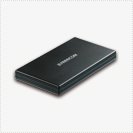
I had a Freecom Classic Mobile HD 2.5" 40Gb external USB hard drive on which I had installed Office 2007 & VS2005. It stopped working today despite only having bought it a couple of months ago.
Tuesday, June 20, 2006
Desktop background

Here is my favourite 1900 x 1200 photo of Meribel that I took earlier this year. Feel free to use it as your desktop background.
Download File
Monday, June 19, 2006
10GBaseT & Cabling Standards
Last week I was at the British Standards Institute TCT7 committee meeting reviewing several important changes to the UK & European cabling standards. I thought I would provide a quick summary, if you would like any further details please ask.
10GBaseT – Ethernet Standards
The IEEE have finished the 10 Gigabit Ethernet over copper cabling standard on time and it will be officially published very soon. However there is widespread concern that important elements have been omitted in a rush to finish the standard “on time”. Please remember the 10GBaseT standard is an electronic protocol standard NOT a cabling standard. 10GBaseT will support a channel length of 100m over Cat 6 FTP and Cat 7 FTP (both available today) and over 100m of Cat6a UTP (in the future – standard work is just starting now). The chipset manufacturers are having problems with the large amount of power needed for each chip. They currently need about 15W per port, unfortunately the chips themselves will only support 4W without overheating. As a result the pre-production chips are having to be manufactured in a larger package so they can disperse the heat better. The amount of power required is a big concern as a typical 24 port 1U switch will get very hot and thus un-reliable. The electronics industry is hoping that by making the chips smaller they can reduce the heat output, unfortunately this technology is not currently available but should be within 4-5 years. Some manufacturers have introduced pre-standard chipsets but they do not work with each other as they use different techniques to reduce power requirements. The current non-standard chipsets have only been able to manage a 30m link over Cat 6 as these can be produced more easily as they do not need as much electronics and so stay cooler. There is significant work to do before 10GBaseT becomes mainstream, do not expect widespread desktop deployment for 5-7 years.
European Cabling Standards
Firstly it’s important to remember that there are two cabling standards the American TIA/EIA who define Cat 5, Cat 5e, Cat 6 and will define Cat 6a in the future. The rest of the world uses the ISO 11801:2002 Class D, Class E (and Class Ea in the future) series of standards. Until now Cat 5e and Cat 6 have been almost identical to Class D and Class E however the American Cat 6a standard is looking as though it will be much less stringent than the Worldwide Class Ea standard. This problem of Cat 6a not being equal to Class Ea is a big issue that will hopefully be resolved before either standard is published. The very earliest these standards could be published is Q2 2007 but this would mean several important items would have to be left out and added later.
Official work on the cabling standard could not start until the 10GBaseT standard was published. Today we reviewed some of the proposed amendments to ISO 11801:2002 to add Class Ea limits. The amendments proposed will probably be rejected by the UK committee because they are very incomplete and in places simply wrong. Some of the cabling manufacturers are pushing to get this amendment published to support their “10Gig” product story. However the amendments include parameters for the “Channel” only, there are no “Permanent link” limits. This has been done in an attempt to speed up the process, adding permanent link parameters will take an extra 12-18 months. Without any “Permanent link” limits there will be nothing that installers can use to test a system. In my view there is no point publishing a new standard if it does not have any parameters that can be used to test against. The standard needs to be done properly with both channel and permanent link limits, it is likely that this process will take until at least Q2 or Q3 2008.
Any cable manufacturer pushing a “10 Gig” story now is really selling something that is still 18-24 months from being completed. (and that assumes everything goes to plan... history shows that this seldom happens and the process will take much longer)
XML Test Result Export
My initiative to create a standard file format for exporting test results from handheld testers is now a European EN50346 draft format and will be fully reviewed at the September meeting.
10GBaseT – Ethernet Standards
The IEEE have finished the 10 Gigabit Ethernet over copper cabling standard on time and it will be officially published very soon. However there is widespread concern that important elements have been omitted in a rush to finish the standard “on time”. Please remember the 10GBaseT standard is an electronic protocol standard NOT a cabling standard. 10GBaseT will support a channel length of 100m over Cat 6 FTP and Cat 7 FTP (both available today) and over 100m of Cat6a UTP (in the future – standard work is just starting now). The chipset manufacturers are having problems with the large amount of power needed for each chip. They currently need about 15W per port, unfortunately the chips themselves will only support 4W without overheating. As a result the pre-production chips are having to be manufactured in a larger package so they can disperse the heat better. The amount of power required is a big concern as a typical 24 port 1U switch will get very hot and thus un-reliable. The electronics industry is hoping that by making the chips smaller they can reduce the heat output, unfortunately this technology is not currently available but should be within 4-5 years. Some manufacturers have introduced pre-standard chipsets but they do not work with each other as they use different techniques to reduce power requirements. The current non-standard chipsets have only been able to manage a 30m link over Cat 6 as these can be produced more easily as they do not need as much electronics and so stay cooler. There is significant work to do before 10GBaseT becomes mainstream, do not expect widespread desktop deployment for 5-7 years.
European Cabling Standards
Firstly it’s important to remember that there are two cabling standards the American TIA/EIA who define Cat 5, Cat 5e, Cat 6 and will define Cat 6a in the future. The rest of the world uses the ISO 11801:2002 Class D, Class E (and Class Ea in the future) series of standards. Until now Cat 5e and Cat 6 have been almost identical to Class D and Class E however the American Cat 6a standard is looking as though it will be much less stringent than the Worldwide Class Ea standard. This problem of Cat 6a not being equal to Class Ea is a big issue that will hopefully be resolved before either standard is published. The very earliest these standards could be published is Q2 2007 but this would mean several important items would have to be left out and added later.
Official work on the cabling standard could not start until the 10GBaseT standard was published. Today we reviewed some of the proposed amendments to ISO 11801:2002 to add Class Ea limits. The amendments proposed will probably be rejected by the UK committee because they are very incomplete and in places simply wrong. Some of the cabling manufacturers are pushing to get this amendment published to support their “10Gig” product story. However the amendments include parameters for the “Channel” only, there are no “Permanent link” limits. This has been done in an attempt to speed up the process, adding permanent link parameters will take an extra 12-18 months. Without any “Permanent link” limits there will be nothing that installers can use to test a system. In my view there is no point publishing a new standard if it does not have any parameters that can be used to test against. The standard needs to be done properly with both channel and permanent link limits, it is likely that this process will take until at least Q2 or Q3 2008.
Any cable manufacturer pushing a “10 Gig” story now is really selling something that is still 18-24 months from being completed. (and that assumes everything goes to plan... history shows that this seldom happens and the process will take much longer)
XML Test Result Export
My initiative to create a standard file format for exporting test results from handheld testers is now a European EN50346 draft format and will be fully reviewed at the September meeting.
Subscribe to:
Posts (Atom)

